We all know that Android 11 is going to be released soon. Check out here the android 11 new features.
We all are excited about Android 11 and want to know the new features.
Because new features will bring new excitement and new user experience.
Here, are the new features:
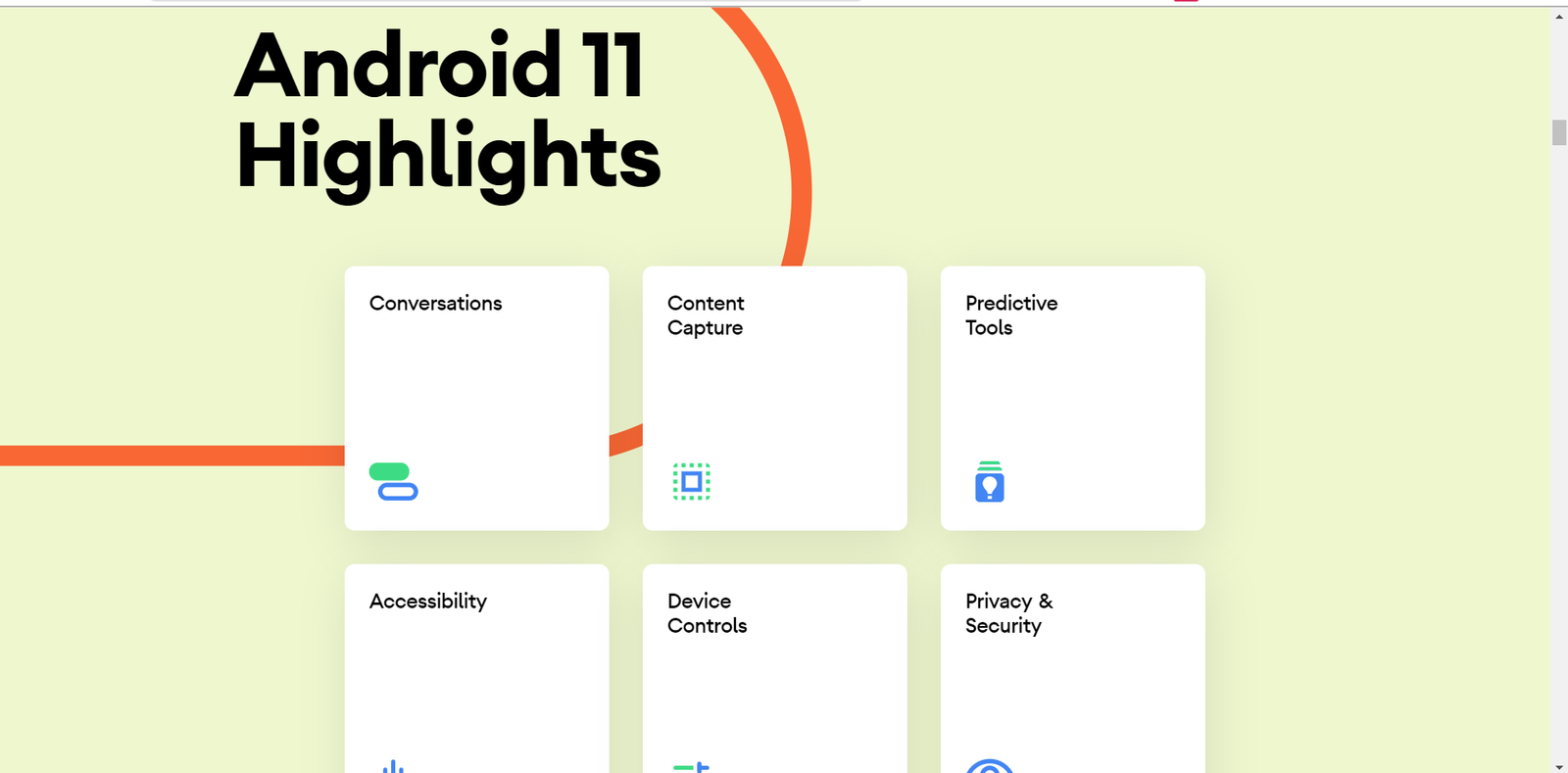
android
We can see the biggest highlights are conversations, content capture, predictive tools, accessibility, device controls, and privacy and security, etc.
Conversations
Your conversations are across messaging apps that are now in one spot and can be prioritized.
Bubbles
With bubbles, multitask and respond to messages without having to open the chat app.
Screen Recorder
Effortlessly capture video, calls, gameplay, and more with a built-in screen recorder.
Controls
Access and control your connected devices by long-pressing the power button.
Media Controls
Conveniently switch from headphones to speakers, to your TV’s and more.
Android Auto
Skip the cable and wirelessly connect your phone to your car.
Privacy
One-time permissions give apps access to your microphone, camera, or location just that one time.
Permissions auto-reset
If an app hasn’t been used for a while it’s permissions will auto-reset.
Google play system updates
Get even more security and privacy fixes sent to your phone from Google play-the same way all your other apps updated.
Security
These are the new security features added or optimized in Android 11.
BIOMETRIC AUTHENTICATION UPDATES
To help you control the level of security for your app’s data, Android 11 provides several improvements to biometric authentication.
SECURE SHARING OF LARGE DATASETS
In some situations, such as those that involve machine learning or media playback, your app might want to use the same large dataset as another app. In previous versions of Android, your app and another app would each need to download a separate copy of the same dataset.
Perform file-based encryption after an OTA restart without user credentials
After the device completes an OTA update and restarts, the Credential Encrypted keys (CE) that are placed in credential-protected storage are immediately available for File-Based Encryption (FBE) operations. This means that, after an OTA update, your app can resume operations that require the CE keys before the user enters their PIN, pattern, or password.
Performance and quality
There are various performance and quality checks are added in ANDROID 11. Such as-
-
Wireless Debugging
Android 11 supports deploying and debugging your app wirelessly from your workstation via Android Debug Bridge (adb). For example, you can deploy your debuggable app to multiple remote devices without physically connecting your device via USB and contending with common USB connection issues, such as driver installation.
-
ADB Incremental APK installation
ADB (Android Debug Bridge) Incremental APK installation accelerates this process by installing enough of the APK to launch the app while streaming the remaining data in the background.
-
Text and input
GWP-ASan is a native memory allocator feature that helps find use-after-free and heap-buffer-overflow bugs. You can enable this feature globally or for specific subprocesses of your app.
-
Error detection using the native memory allocator
New machine learning controls are added.
-
Neural Networks API 1.3
The Android Neural Networks API (NNAPI) is an Android C API designed for running computationally intensive operations for machine learning on Android devices
-
Media
Android 11 includes a new MediaCodec APIs that gives apps more control when allocating input and output buffers. This lets your app manage memory more efficiently.
-
Connectivity
- Wifi pass point enhancements
- Expiration date enforcement and notification
- FQDN matching
- Self-signed private CAs
- Allow multiple profiles with identical FQDN
- Allow installing profiles without a Root CA certificate
- Improved Home and Roaming provider matching
-
Graphics
-
Images and camera
-
Support for concurrent use of more than one camera
-
Accessibility
To see more details check here: developer.android
ADDITIONAL FEATURES
- App process exit reasons
- Resource loaders
- APK signature scheme V4
- Dynamic intent filters
- Autofill enhancements
- Data sharing with content capture service.
Here, we see many new features are added in the latest Android 11 update. So, when the update arrives, download and install it.
These are the best android 11 new features.
ALSO, READ
- 25 BEST GAMES FOR POCO X3
- BEST RACING GAMES FOR ANDROID TO ENJOY THE JOURNEY
- WINDOWS 10 2004 UPDATE has ARRIVED FOR WINDOWS 10 DEVICES
- Top 10 Best Android Apps August 2020
- POCO X2 MIUI 12.0.1.0 UPDATE IS ROLLING OUT NOW, 20+ NEW FEATURES AND THEMES AND WALLPAPERS




![New Android Games From February 2022 [Part 4]](https://appscountry.com/wp-content/uploads/2022/02/New-Android-Games-From-February-2022-Part-4-1-300x200.jpg)




![New Android apps from January 2022 [Part 2]](https://appscountry.com/wp-content/uploads/2022/01/New-Android-apps-from-January-2022-Part-2-1-300x200.jpg)






![16 BEST MUSIC APPS IN INDIA TO ENJOY MUSIC [2021]](https://appscountry.com/wp-content/uploads/2021/07/BEST-MUSIC-APPS-IN-INDIA-1-300x200.jpg)